Download and extract
Use the ZIP button above and extract Luffy-Video-Download-Helper-0.4.4.zip. It contains extension/, native/ and instructions. GitHub’s automatic Source code archives require a separate build.
 Luffy Liu
 LUFFY / VIDEO v0.4.4
Discover, preview, download. Use it from your browser or a local Agent. No account. Media processing stays on your computer.
Manual installation · Not currently listed in an extension store
Chrome / Edge. The helper for YouTube, X and MCP currently supports macOS only.
Source on GitHub ↗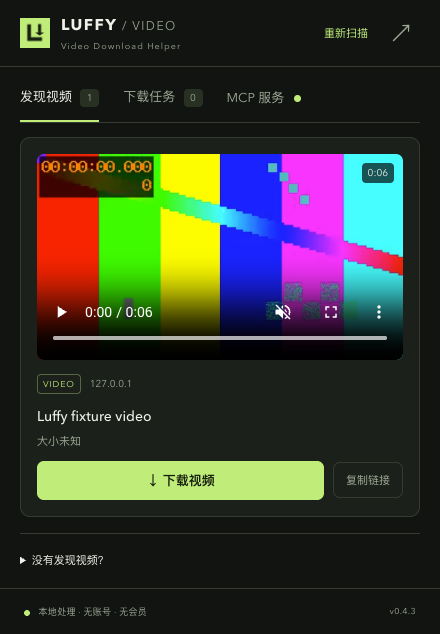
Preview direct files and HLS streams, then choose a download.
Merge HLS in the browser; resolve YouTube / X with the native helper.
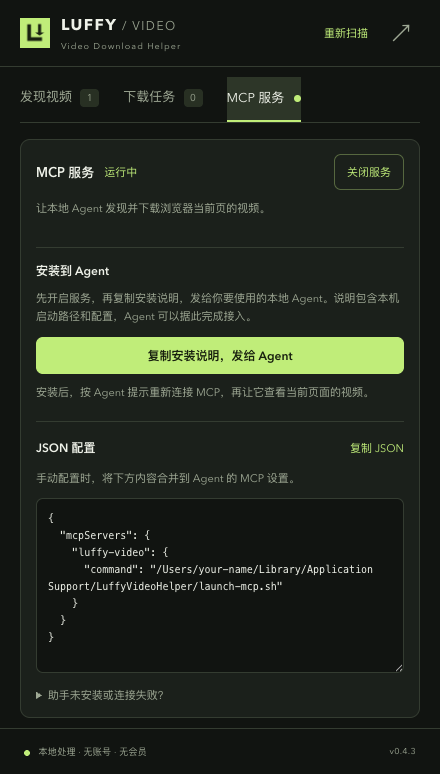
Use MCP to inspect the current page, download a video and find the saved file.
01 / INSTALL
No build tools needed for the extension ZIP. Follow these four steps to load it into your browser.
Use the ZIP button above and extract Luffy-Video-Download-Helper-0.4.4.zip. It contains extension/, native/ and instructions. GitHub’s automatic Source code archives require a separate build.
Paste chrome://extensions into Chrome’s address bar, or edge://extensions in Edge. Enable Developer mode.
Click Load unpacked and select the extension folder inside the extracted directory, not the ZIP or its outer folder. Keep it in a permanent location: the browser continues to read it.
Pin Luffy in the toolbar’s extensions menu. Play a video on the target page and open Luffy. The video list appears first; rescan or reload and play again if it is empty.
Select this folder after extracting
Luffy-Video-Download-Helper-0.4.4/
├── extension/ ← Load unpacked
├── native/
├── Install-Luffy-Helper.command
└── README.md
02 / LOCAL HELPER
Skip this step for ordinary direct downloads or browser HLS. The helper installer currently supports macOS and requires Python 3.10+, Node.js and FFmpeg.
If needed, install prerequisites with Homebrew using the command below. Then double-click Install-Luffy-Helper.command in the extracted directory and wait for completion. Alternatively, run python3 native/install.py from that directory in Terminal. Initial setup requires internet access.
brew install python node ffmpegReload the extension after installation. Restart the browser if an updated helper still reports an unknown operation or outdated version. Browser downloads follow browser settings; native output goes to ~/Downloads/Luffy/.
03 / AGENT ACCESS
Green: running · Gray: off · Red: error. The service starts disabled and remembers your choice.
“Use Luffy to list videos on the current page, download the one I choose, and tell me where it was saved.”
04 / FAQ
Download the new ZIP, extract to a permanent location and reload the extension. If the path changes, remove the old extension and load the new folder; settings may reset. Re-run the helper installer when it is updated.
The current distribution method is a GitHub ZIP. There is no store installation entry yet; this does not mean a store rejection has been confirmed.
DRM, SAMPLE-AES and live streams are unsupported. Browser HLS input is capped at 256 MiB; try the native helper for larger files. DASH has a native route but no dedicated acceptance test. Login, region and expiring URLs may affect downloads.
Not by default. Local yt-dlp reads browser cookies only after you explicitly select a login source in download settings.
Closing the popup leaves downloads running. Disabling MCP blocks new Agent calls while existing jobs continue. Job records last for the browser session.